 Lock Screen iOS 26
 Loading..

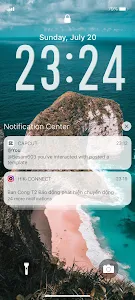

Open from the Lock screen & Notifications iOS 26
You can quickly view your recent notifications from the Lock screen by turn on your phone.
You can also do these things from the Lock Screen & Notificaions iOS 26:
- Tap a single notification or a group of notifications to view all of them for that app.
- Swipe left over notifications to manage view or clear the notifications.
- Manage alerts for specific apps.
Learn how to set use and change a passcode on your device.
Set a passcode on your phone to help protect your data.
Set up a passcode
- On your phone open Lock Screen & Notification ap.
- Tap Passcode option.
- Enable Passcode and Enter a six-digit passcode.
- Enter your passcode again to confirm it and activate it.
To make Lock Screen & Notifications iOS 15 working most perfect. You must grant some special permissions like to:
- CAMERA: To open camera in your phone.
- READ_PHONE_STATE: To turn off lockscreen while calling.
- NOTIFICATION ACCESS: To get notifications in your phone.
- READ/WRITE_EXTERNAL_STORAGE: To download more wallpaper.
- DRAW OVER SCREEN: To show Lock Screen & Notification in over all apps.
How to use Lock Screen & Notificaions iOS 26: https://youtu.be/HS-L0jAF0Vw
You can quickly view your recent notifications from the Lock screen by turn on your phone.
You can also do these things from the Lock Screen & Notificaions iOS 26:
- Tap a single notification or a group of notifications to view all of them for that app.
- Swipe left over notifications to manage view or clear the notifications.
- Manage alerts for specific apps.
Learn how to set use and change a passcode on your device.
Set a passcode on your phone to help protect your data.
Set up a passcode
- On your phone open Lock Screen & Notification ap.
- Tap Passcode option.
- Enable Passcode and Enter a six-digit passcode.
- Enter your passcode again to confirm it and activate it.
To make Lock Screen & Notifications iOS 15 working most perfect. You must grant some special permissions like to:
- CAMERA: To open camera in your phone.
- READ_PHONE_STATE: To turn off lockscreen while calling.
- NOTIFICATION ACCESS: To get notifications in your phone.
- READ/WRITE_EXTERNAL_STORAGE: To download more wallpaper.
- DRAW OVER SCREEN: To show Lock Screen & Notification in over all apps.
How to use Lock Screen & Notificaions iOS 26: https://youtu.be/HS-L0jAF0Vw
Show More >
Lock Screen iOS 26 / What's New in vUnknown
THIS RELEASE:
- Update new Launcher iOS 26.
- Update new Lockscreen iOS 26.
- Fix all issue reported by user.
THANK YOU SO MUCH FOR USING MY APPS :)
- Update new Launcher iOS 26.
- Update new Lockscreen iOS 26.
- Fix all issue reported by user.
THANK YOU SO MUCH FOR USING MY APPS :)


